US and Japan visa photos: fitting 2×2 inches and 45×35 mm from one original
Written · Updated · Operator (individual)
A US visa needs a square 2×2-inch photo, while the Japanese visa application form asks for a tall 45×35 mm one. You can make both from one original, but simply resizing it leaves the face at the wrong proportion. We collected the numbers from the official pages, then saved both formats from a drawn figure in MiruKit’s ID photo tool and compared them.
What does a US visa photo need?
The US Department of State visa photo page asks for a 2×2-inch (51×51 mm) photo with the head between 1 inch and 1⅜ inches from the bottom of the chin to the top of the head, or 50% to 69% of the image height. It must be in color, taken within the last 6 months, in front of a plain white or off-white background. Eyeglasses are no longer allowed in new visa photos except in rare medical cases, which need a statement signed by a medical professional. Photos must not be digitally enhanced or altered to change your appearance.
Files uploaded to online forms such as the DS-160 follow the digital image requirements: square, at least 600×600 and at most 1200×1200 pixels, in color (sRGB), and 240 kB or less. The same page says the compression ratio should be 20:1 or less. Acceptance is at the discretion of the embassy or consulate where you apply.
How is a Japanese visa photo different?
The Ministry of Foreign Affairs of Japan form, VISA APPLICATION FORM TO ENTER JAPAN, labels its photo box 45mm × 35mm, or 2in x 1.4in. That is 45 mm tall and 35 mm wide, a portrait shape rather than a square. The form does not give a head-size figure, so check the guidance of the embassy or consulate where you apply for the photo conditions.
MOFA also offers an online JAPAN eVISA for residents of certain countries and regions. There you upload a file, so follow the file conditions shown in the eVISA application screens. We could not confirm the pixel and file-size limits of those screens for this article. Short stays are visa-exempt for some travelers, so first check whether you need a visa at all.
Which presets does MiruKit have?
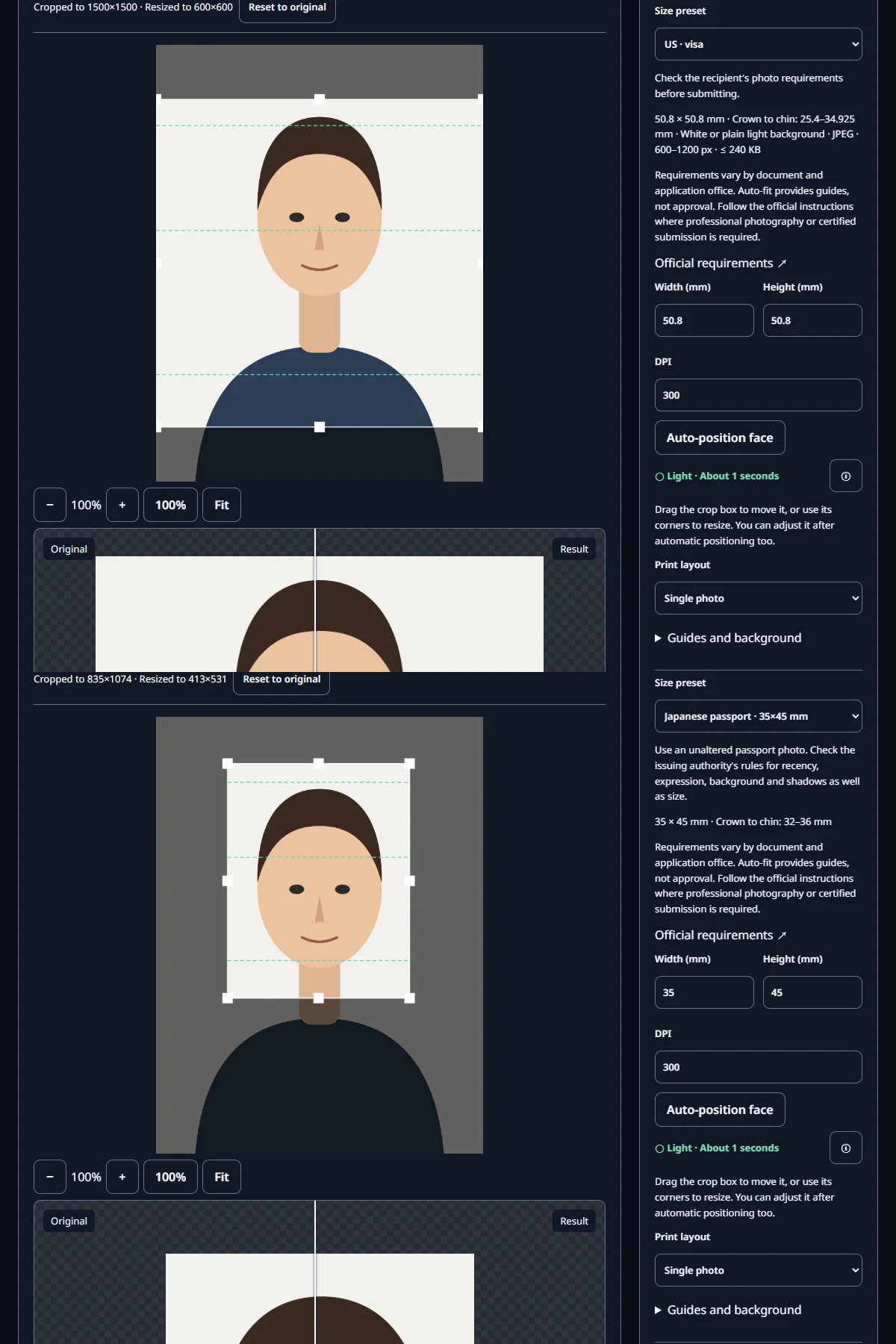
ID photo’s Size preset list includes US · visa. Selecting it shows 50.8 × 50.8 mm, Crown to chin: 25.4–34.925 mm, and JPEG · 600–1200 px · ≤ 240 KB. There is no dedicated Japanese visa preset yet. Use Japanese passport · 35×45 mm, which has the same frame, or choose Custom size and enter 35 for width and 45 for height. The Crown to chin: 32–36 mm hint shown for the Japanese passport preset is a passport guide, not a figure from the visa form.
What did our saved files look like?
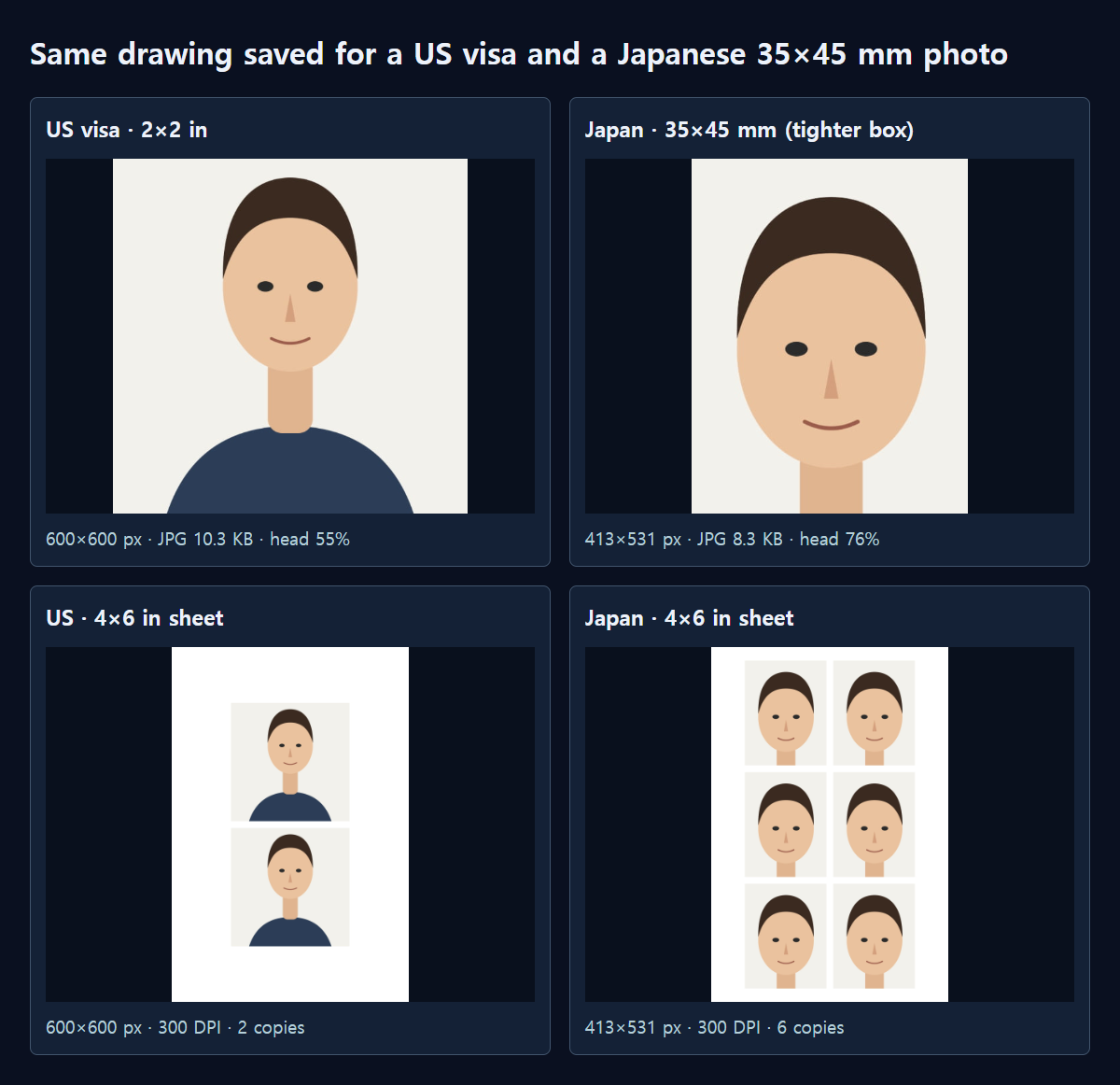
We used a drawn 1500×2000 figure instead of a real face. With US · visa at 300 DPI and JPG quality 85, the saved file was 600×600 pixels and 10.3 KB. The head took up 54.7% of the height, inside the 50–69% range. Quality 100 gave 31.1 KB and PNG gave 23.7 KB, but the US page asks for a JPEG file, so save as JPEG. Raising DPI to 600 produced 1200×1200 pixels and 23.0 KB, exactly the maximum size.
Switching the same drawing to Japanese passport · 35×45 mm, the tool first picked a 1500×1929 area, in which the drawn head was only about 43% of the height. After dragging a corner to make the box smaller and moving it over the face, the 413×531-pixel, 8.3 KB file showed the head at 76.3%, about 34.3 mm. You cannot simply stretch the US photo; reposition the box for each format.
How should I read the 20:1 compression ratio?
Let’s calculate the ratio as uncompressed size divided by file size. A 600×600 color image is 600×600×3 = 1,080,000 bytes before compression, so 20:1 corresponds to about 54,000 bytes (52.7 KB). Our test files were compressed far more than that: about 102:1 at quality 85 and about 34:1 even at quality 100. That is because a drawing with flat, even colors stores very compactly.
A real face photo has hair and skin texture, so the same settings produce a larger file. The official page does not describe in more detail how the ratio is measured, so a practical approach is to save at high quality and check that the file stays at or under 240 kB. At 1200×1200 the uncompressed size is 4,320,000 bytes, which puts the 20:1 point at about 216,000 bytes, close to the 240 kB ceiling.
Steps for both formats
- Open an original with room above the head and down to the shoulders.
- Choose US · visa under Size preset and adjust the box so the head is 50–69% of the height.
- Choose JPEG in File settings, save, and check that the file is at least 600×600 and no more than 240 KB.
- Switch to Japanese passport · 35×45 mm, then make the box smaller again and position the face.
- For prints, choose 4 × 6 in under Print layout. In our test, it placed 2 copies of the US size and 6 of the Japanese size.
Measured with MiruKit
| Saved setting | Pixels | Format · size | Head share |
|---|---|---|---|
| US visa · 300 DPI · JPG 85 | 600×600 | JPG · 10.3 KB | 54.7% |
| US visa · 300 DPI · JPG 100 | 600×600 | JPG · 31.1 KB | 54.7% |
| US visa · 300 DPI · PNG | 600×600 | PNG · 23.7 KB | 54.7% |
| US visa · 600 DPI · JPG 85 | 1200×1200 | JPG · 23.0 KB | 54.7% |
| Japanese passport preset · 300 DPI · JPG 85 | 413×531 | JPG · 8.3 KB | 76.3% |
A drawn 1500×2000 figure, not a real face, was placed in ID photo and saved with the US visa and Japanese passport (35×45 mm) presets. Each saved file was reopened and measured. Head share is the height from the top of the hair to the chin, divided by the image height.
Good to know
The US page prohibits digital alterations. Do not change the background or retouch the skin; use a photo taken against a compliant background from the start.
Rules can change, so check the official sources below right before you apply. MiruKit helps with size and placement and cannot guarantee acceptance.
Official sources
- U.S. Department of State: Photo Requirements (visas)
- U.S. Department of State: Digital Image Requirements
- 日本国外務省 / MOFA: Visa Application Form to Enter Japan (PDF)
- 日本国外務省 / MOFA: JAPAN eVISA
Sources checked 2026-10-27