Round profile pictures: how much the circle hides and where to put the face
Written · Updated · Operator (individual)
Many apps and social networks take the square you upload as a profile picture and show it as a circle. If the crop looked fine but the top of the head vanished after posting, or the face seemed pushed to one side, the circle was hiding parts of the square you did not plan for. This guide measures how much a circle hides and compares four real crops to show where a face is safe.
A circle shows only 78.5% of the square
A circle drawn to fit inside a square keeps 78.5% of its area. Each corner loses 5.4%, or 21.5% in total. The middle of each edge stays visible, but along the diagonal the circle stops 20.7% of the side length short of each corner. On an 800px square that is about 166px hidden along the diagonal at every corner. So the top centre is almost untouched, while the upper-left and upper-right are the first places to be cut.
The same photo cropped four ways
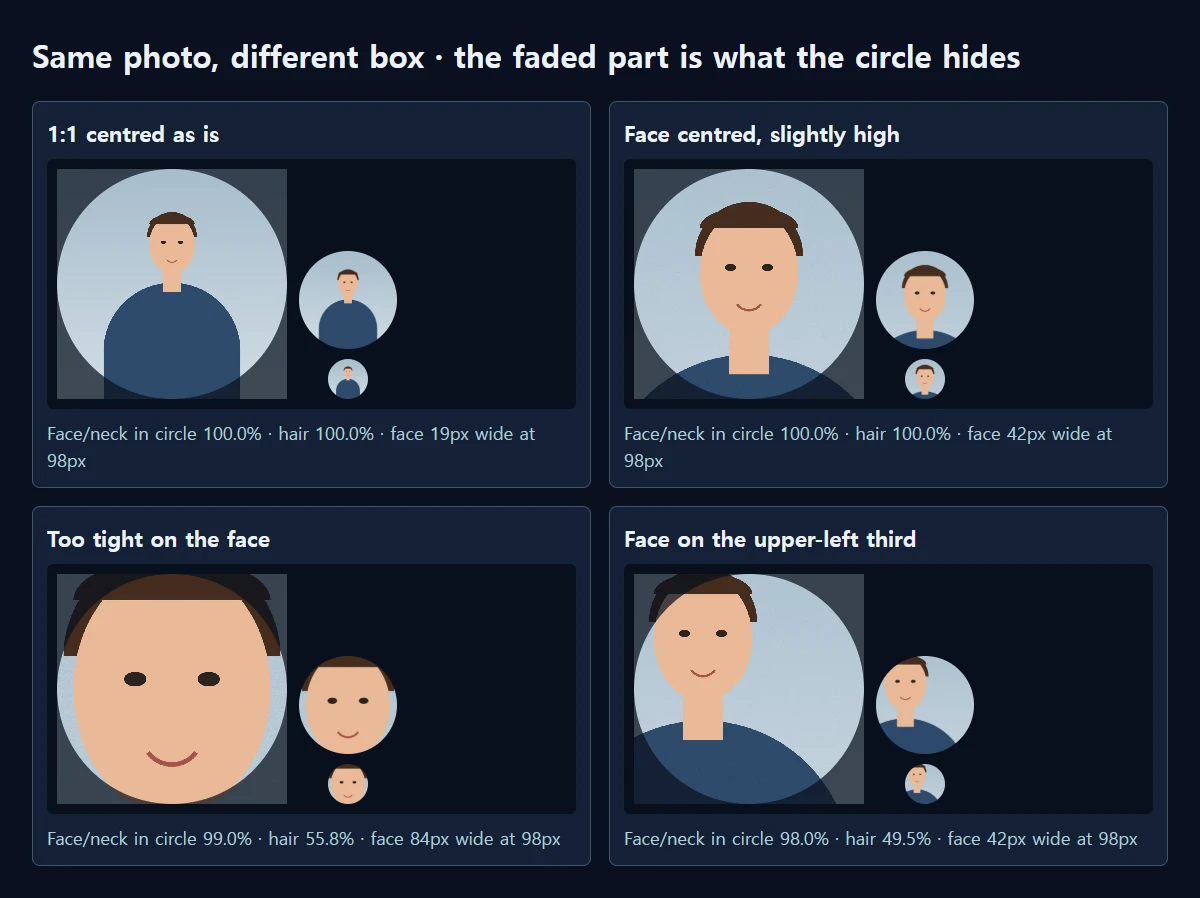
We drew a 3024×4032 portrait and made four squares with the same processing as MiruKit’s Crop photos, then resized each to an 800×800 WebP. MiruKit saves a square, and the circle is drawn by the service you upload to, so we laid a circular mask over each saved file and counted how much of the face, neck and hair stayed inside.
Choosing 1:1 · profile / Instagram and leaving the box where it starts crops the middle of the portrait. Face and hair were fully inside the circle, but the face was only 19.8% of the diameter. YouTube Help says a profile picture renders at 98×98px; at that size the face is about 19px wide, and the picture reads as a shirt with a small head.
With the face centred horizontally, its centre about 45% from the top and its width 42.9% of the diameter, both face and hair stayed fully inside the circle. At 98px the face was 42px wide, enough to tell the eyes from the mouth, and the shoulders filled the lower curve so the circle had little empty space.
Cropping too tightly changes that. A 700px box, smaller than the head, kept 99.0% of the face, but only 55.8% of the hair left in the square was inside the circle. The sides of the hairline were cut off.
Placing the face on the upper-left third, as the rule of thirds suggests for photos, does not suit a circle. Even at the same 42.9% face width, only 49.5% of the hair stayed inside and the face dropped to 98.0%, losing a little of the forehead. The circle is centred, so the face should be centred horizontally too.
Think about the tiny places as well
Profile pictures also appear much smaller, next to comments or in chat lists. Shrinking the same files to a 40px circle makes the difference clearer. In the centred-as-is crop the face was about 8px wide and the features looked like dots; in the 42.9% crop it was 17px and the expression was readable. The tight crop gave the biggest face at 34px, but the cut hairline made it look unfamiliar. Counting small places too, a face taking 40–50% of the diameter is a good balance.
A plain background helps. The edge of the circle is mostly background, and a busy pattern can catch the eye before the face does at small sizes.
How to crop it in MiruKit
- Open the original in Crop photos.
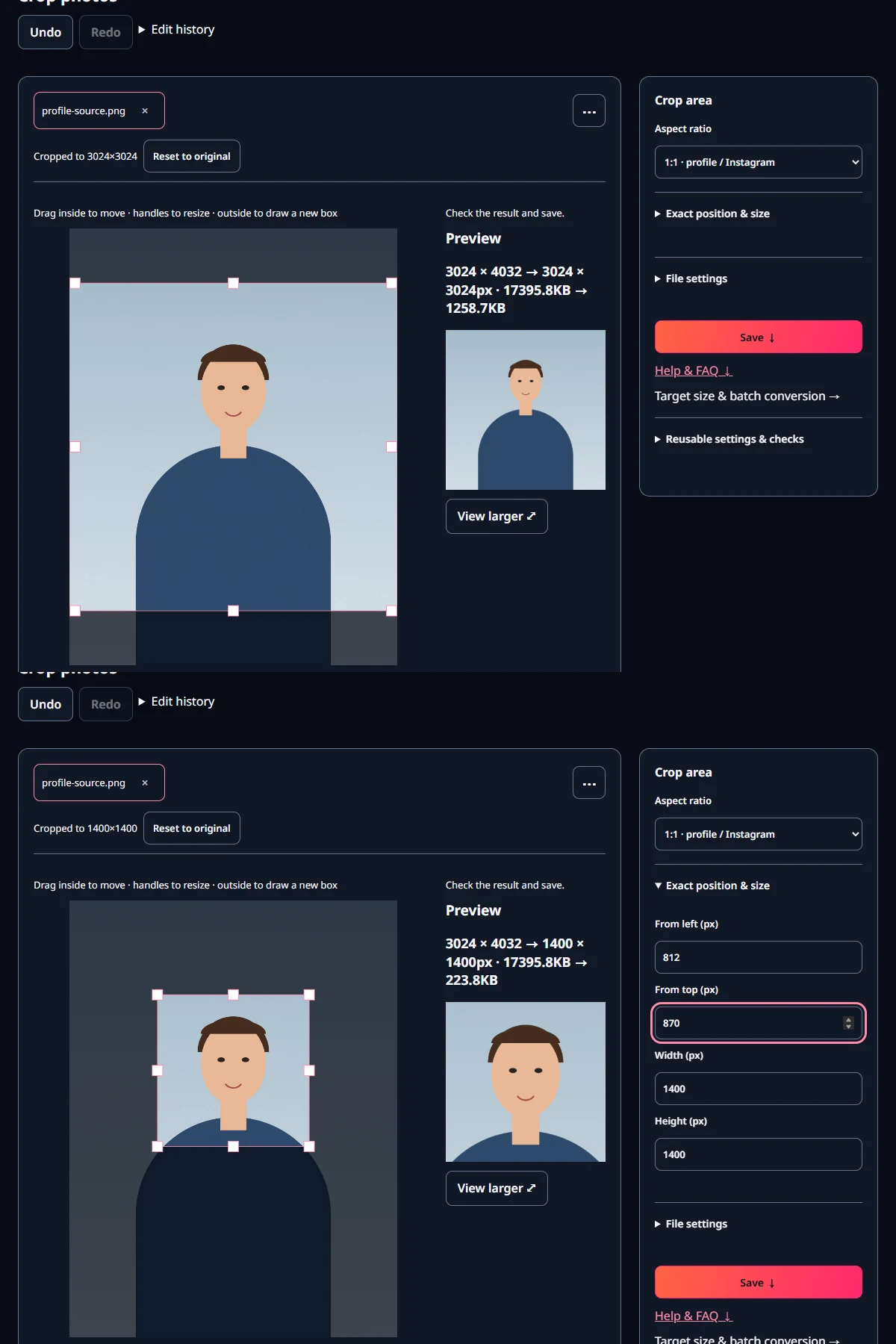
- Under Aspect ratio, choose 1:1 · profile / Instagram. The box starts in the centre.
- Drag a corner handle until the face is about 40% of the box width. Leave roughly 10–15% of the box height above the hair; our best crop used 14%.
- Drag the box so the face is centred horizontally and the eyes sit about 40% from the top. To type numbers, open Exact position & size and edit From left (px) and From top (px).
- Check that nothing important, such as a name or a hand, sits in the four corners, then save.
How many pixels should the square be?
A spot shown at 98px is drawn with 196 device pixels on a 2× screen and 294 on a 3× screen. Saved as WebP, our square was 3.6 KB at 400px, 17.0 KB at 800px and 65.9 KB at 1080px. 400px already covers a 3× screen, and 800px leaves room in case a service shows the picture larger or crops it again. A bigger file does not add sharpness, so around 800px is plenty.
Open the related toolMeasured with MiruKit
| Box placement | Face/neck / hair inside circle | Face width vs circle · at 98px | 800px WebP size |
|---|---|---|---|
| 1:1 centred as is | 100.0% / 100.0% | 19.8% · 19px | 6.0 KB |
| Face centred, slightly high | 100.0% / 100.0% | 42.9% · 42px | 17.0 KB |
| Too tight on the face | 99.0% / 55.8% | 85.7% · 84px | 15.0 KB |
| Face on the upper-left third | 98.0% / 49.5% | 42.9% · 42px | 16.4 KB |
A synthetic 3024×4032 portrait was cropped to four squares by the same processImage the Crop tool uses, then resized to 800×800 WebP (quality 85). The circle is a mask applied to the saved square (MiruKit saves a square; the service you upload to draws the circle). Face/neck and hair were counted by their flat colours.
Good to know
These numbers come from one drawn portrait. Real photos differ with hairstyle, shoulder width and background.
Whether a picture is shown as a circle or a rounded square depends on the service and can change. Check the app’s own preview right after uploading.
Official sources
Sources checked 2026-10-27