Printing at 4×6 or 5×7: pixels you need and what gets cropped
Written · Updated · Operator (individual)
You are about to order prints and the options say 4×6 or 5×7. Two questions decide how happy you will be with the result: is the photo big enough, and which part will be cut off to fit the paper? We fitted a synthetic 4:3 picture to both sizes to see.
How many pixels does each print size need?
Multiply inches by ppi. A 4×6 inch print is 1800×1200 pixels at 300 ppi and 1200×800 at 200 ppi. A 5×7 inch print is 2100×1500 at 300 ppi and 1400×1000 at 200 ppi. We compared those two densities; which one your lab expects is in its own instructions. For a portrait print, swap width and height.
This is a different job from changing the DPI number stored in a file. That is covered in “Does changing a photo to 300 DPI make it sharper?”. Here we look at how many real pixels to prepare and how to handle a different shape.
To check whether a photo is big enough, divide its long side by the long side of the print. A 4032×3024 photo across 6 inches gives about 672 ppi, which is plenty. A smaller 1600×1200 photo gives about 267 ppi across 6 inches and about 229 ppi across 7 inches, short of 300. In our test, fitting it at 300 ppi meant enlarging it 1.13× for 4×6 and 1.31× for 5×7. At 200 ppi both sizes were reductions, so no enlargement was needed.
When the shapes differ, choose one of three fits
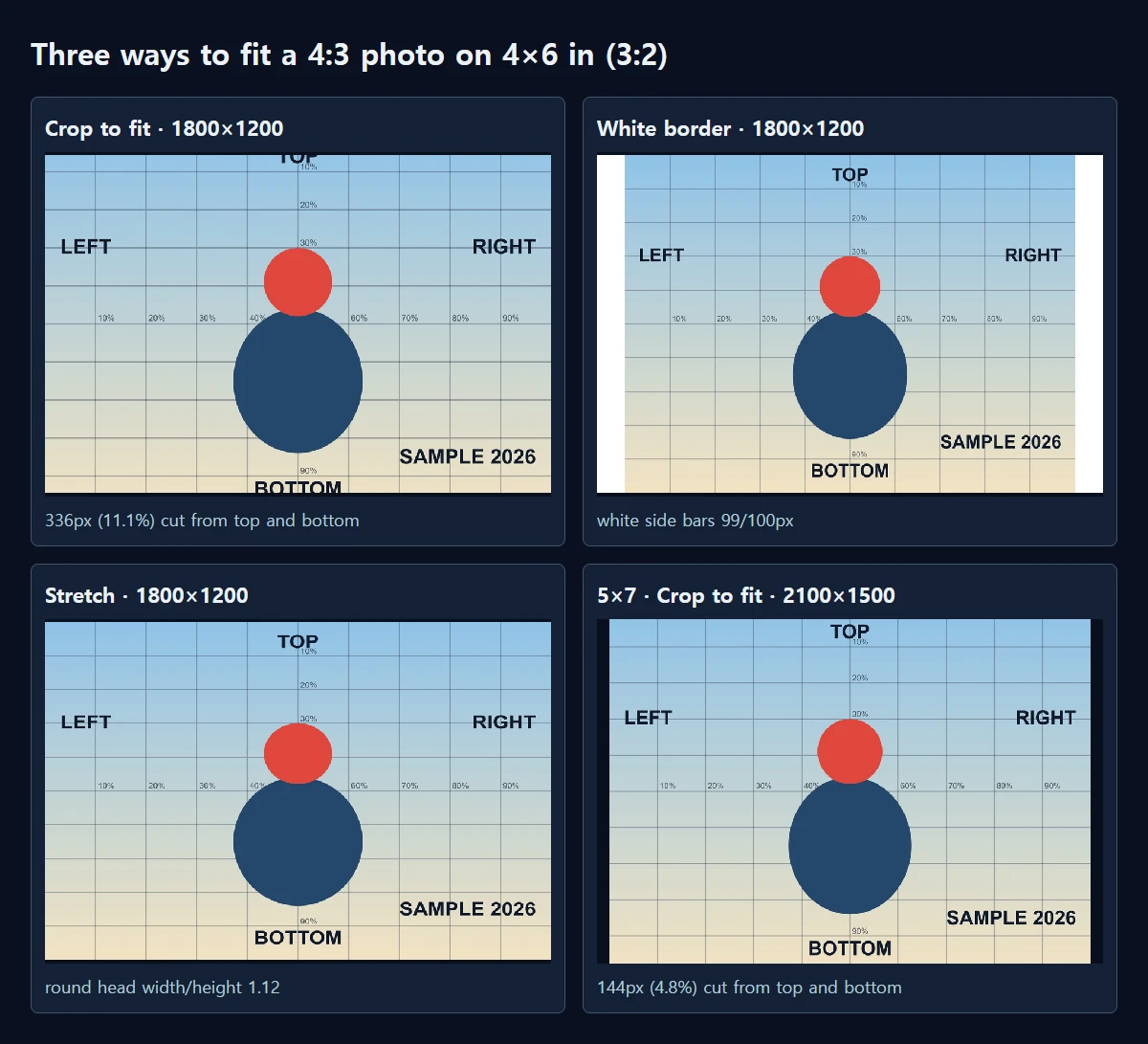
Phone photos are often 4:3, while 4×6 is 3:2 and 5×7 is 7:5. Because the shapes differ, something has to give. We turned the 4032×3024 picture into a 1800×1200 file three ways.
Crop to fit removed 336 pixels in total from the top and bottom, 11.1% of the height. The TOP and BOTTOM labels near the edges were cut in half. A white border kept the whole picture and added white bars of 99 and 100 pixels at the sides. Stretching kept everything but made the round head 1.12 times wider than it is tall. For photos of people, avoid stretching.
5×7 is closer to 4:3, so less is lost. Cropping removed only 144 pixels, 4.8% of the height, and every edge label survived. Stretching distorted the head by 1.04×. If something important sits near the edge, 5×7 may be the easier size.
How to prepare it in MiruKit
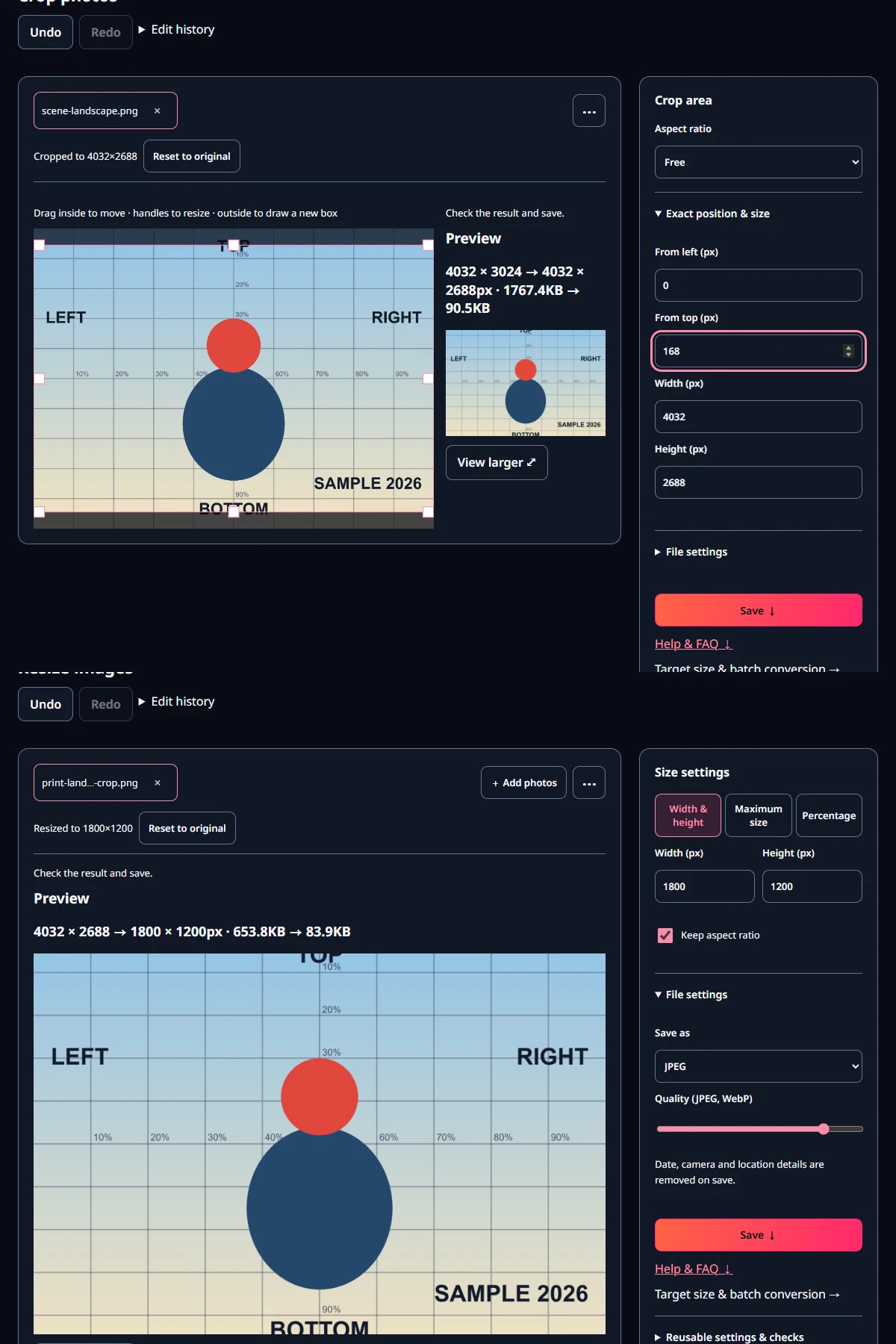
- Open the original in Crop photos and expand Exact position & size. To make 4032×3024 into 3:2, enter a height of 2688 and 168 for From top.
- Move the box up or down to choose what is cut. If there is little room above a head, take more from the bottom.
- Open the cropped copy in Resize images and, under Width & height, enter a width of 1800. With Keep aspect ratio on, the height follows as 1200.
- Under File settings, set Save as to JPEG and save. Our result was 83.9 KB at quality 85.
- If you do not want to crop, use Export several sizes at once and add 1800×1200 as a custom size. That produces a copy with white padding.
Crop first, then resize. Setting the width to 1800 on the uncropped photo gives 1800×1350 with the ratio kept, and a stretched picture with it switched off. Fixing the shape to 3:2 first avoids both.
Check before you order
Open the cropped copy at 100% and look at the edges. In the 4×6 test, about 5.6% of the height disappeared from each of the top and the bottom, so make sure no hairline or date stamp sits in that band. When several photos go into the same order, the subject is in a different place in each, so moving the box photo by photo is safer than cropping them all from the centre.
What if the lab fits the photo for me?
If the service offers a choice such as fill or fit, fill behaves like crop to fit and fit behaves like a white border. The difference is that the service decides where to cut. Cropping yourself lets you choose what goes, and you are less likely to receive prints with the top of a head or a date missing.
Open the related toolMeasured with MiruKit
| Source · print · method | Output · size | What changed |
|---|---|---|
| 4×6 in · 300 ppi · Crop to fit | 1800×1200 · 83.9 KB | 336px (11.1%) cut from top and bottom |
| 4×6 in · 300 ppi · Stretch | 1800×1200 · 94.6 KB | round head width/height 1.12 |
| 4×6 in · 300 ppi · White border | 1800×1200 · 91.2 KB | white side bars 99/100px |
| 4×6 in · 200 ppi · Crop to fit | 1200×800 · 53.7 KB | 336px (11.1%) cut from top and bottom |
| 5×7 in · 300 ppi · Crop to fit | 2100×1500 · 113.3 KB | 144px (4.8%) cut from top and bottom |
| 5×7 in · 300 ppi · Stretch | 2100×1500 · 110.0 KB | round head width/height 1.04 |
| 5×7 in · 300 ppi · White border | 2100×1500 · 115.8 KB | white side bars 50/50px |
| 5×7 in · 200 ppi · Crop to fit | 1400×1000 · 65.3 KB | 144px (4.8%) cut from top and bottom |
| Small 1600×1200 · 4×6 in · 300 ppi · Crop to fit | 1800×1200 · 79.1 KB | 133px (11.1%) cut from top and bottom · enlarged 1.13× |
| Small 1600×1200 · 4×6 in · 200 ppi · Crop to fit | 1200×800 · 52.4 KB | 133px (11.1%) cut from top and bottom |
| Small 1600×1200 · 5×7 in · 300 ppi · Crop to fit | 2100×1500 · 105.9 KB | 57px (4.8%) cut from top and bottom · enlarged 1.31× |
| Small 1600×1200 · 5×7 in · 200 ppi · Crop to fit | 1400×1000 · 65.3 KB | 57px (4.8%) cut from top and bottom |
Synthetic 4032×3024 and 1600×1200 scenes. Crop to fit = Crop (full width, centred) then Resize via processImage; white border = Export several sizes (renderSizes, padding 0); stretch = Resize without keeping the ratio. All JPEG quality 85. Shape distortion is the width/height of the red head pixels.
Good to know
The 300 and 200 values are the two densities we compared. Check the resolution, size and file format your lab actually asks for.
The file sizes come from a simple synthetic picture; real photos are usually much larger. Save the print copy under a different name from the original.