Turn a PNG logo into a favicon ICO: which sizes to include and what they cost
Written · Updated · Operator (individual)
Your website builder or app settings ask for a favicon or icon as an ICO file. Save a square, transparent PNG logo as ICO in Convert, and several icon sizes are packed into one file. The sizes you include change the file size by a factor of nearly 25, so we saved a logo of our own and opened the resulting file to check every image inside it.
What's inside an ICO file?
ICO is a format that holds several icons of different sizes in one file. The idea is that a small spot, such as a browser tab, can use a small picture, while a larger spot can use a bigger one. When you choose ICO in Save as in MiruKit's Convert tool, "ICO sizes to include (px)" lets you pick from 16, 24, 32, 48, 64, 128 and 256. Six of them, all except 24, are selected at the start.
What did we get when we saved one?
We drew a 512×512 transparent PNG logo ourselves (20.2 KB): a blue rounded square with a white M, a yellow dot at the top right and small "kit" text at the bottom. We saved it as ICO through the same processing that Convert uses, then read the saved file's directory directly to check the size and bytes of every image inside.
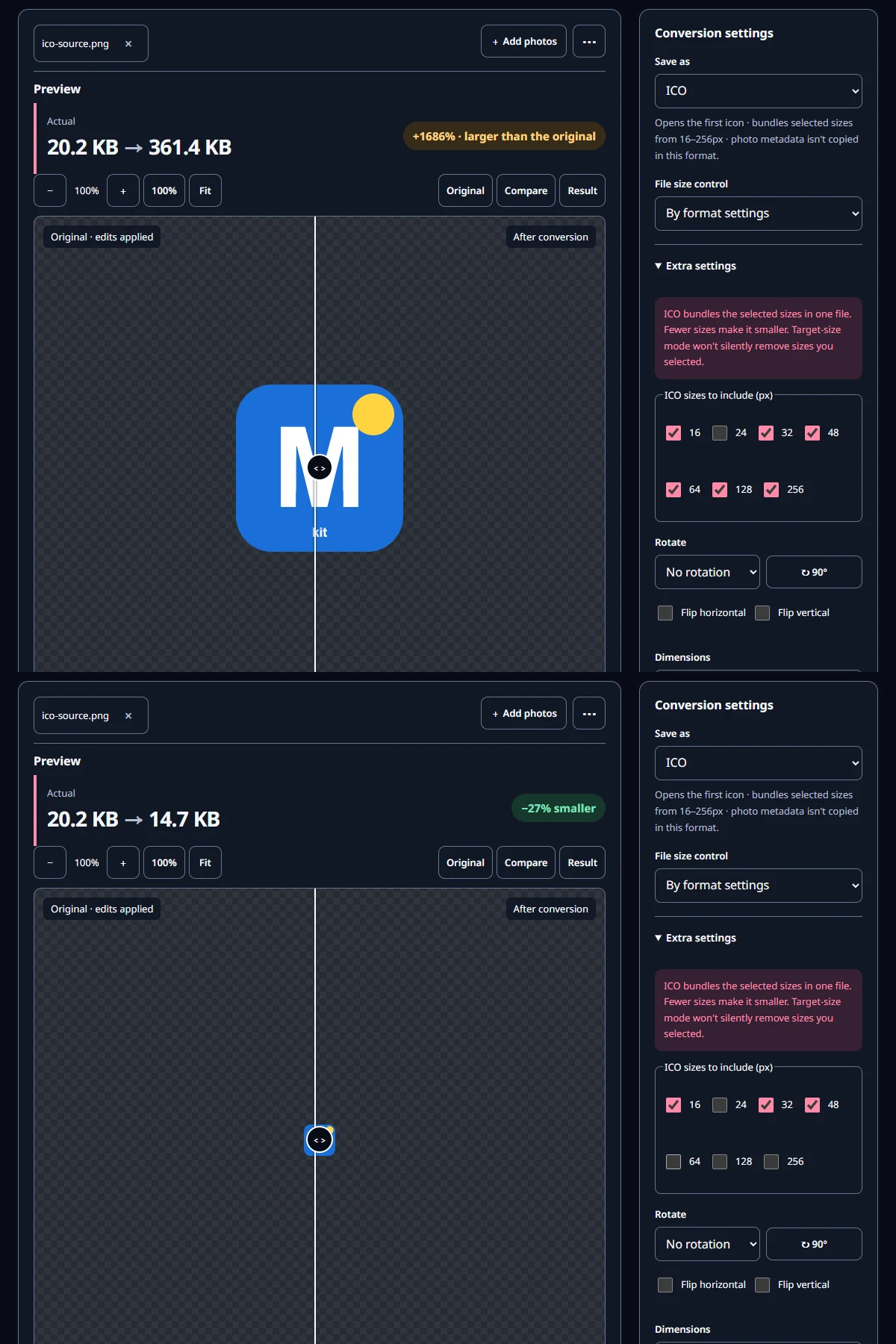
The ICO with the default six sizes was 361.4 KB, far bigger than the source PNG. The 256×256 image alone took 264.0 KB and the 128×128 image 66.0 KB. MiruKit stores each size in the ICO as an uncompressed 32-bit picture, so bigger sizes grow the file quickly. With all seven sizes, the file was 363.8 KB.
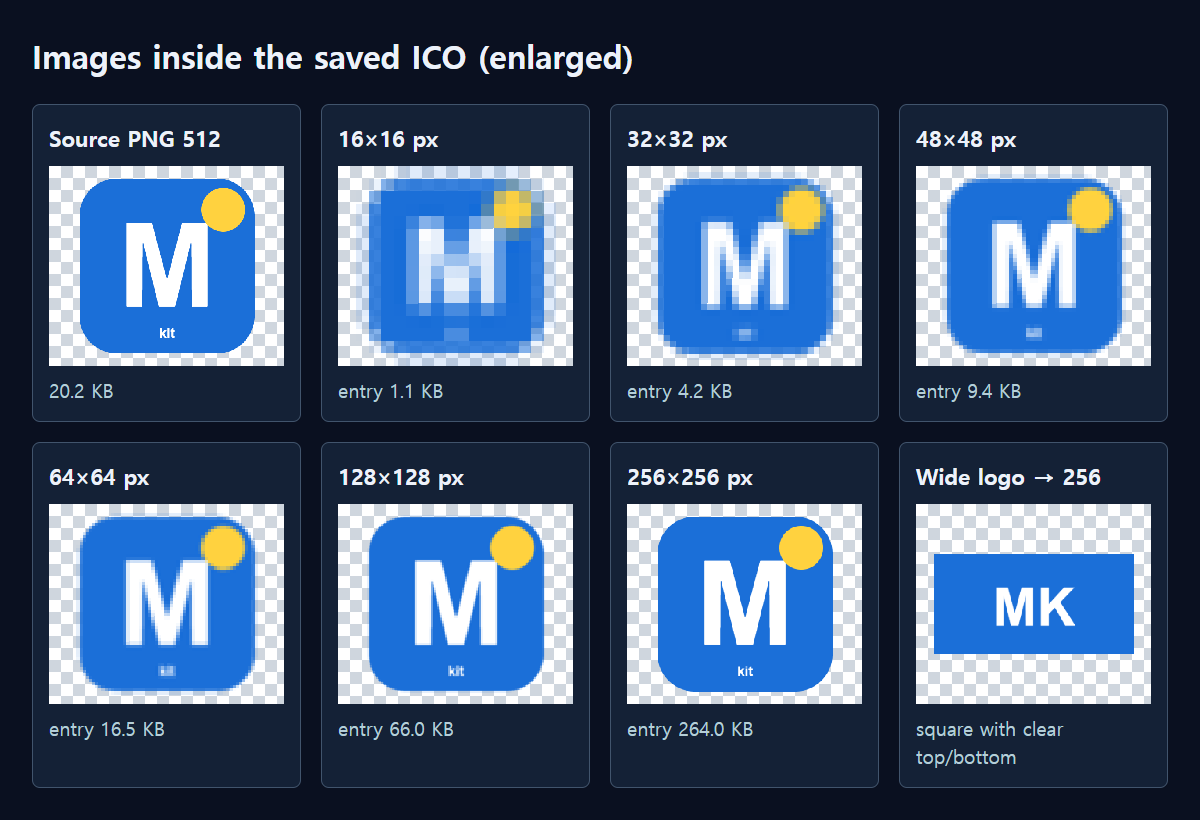
With only 16, 32 and 48, the ICO was 14.7 KB, nearly 25 times smaller than the default. The 16×16 image was 1.1 KB, 32×32 was 4.2 KB and 48×48 was 9.4 KB. Every image was stored at 32 bits, so the transparent corners stayed transparent.
What can you still see at small sizes?
The figure below shows each image from inside the ICO, decoded and enlarged. From 32×32 upward the M and the yellow dot stayed crisp, but at 16×16 the strokes of the M started to blur together, and the small "kit" text was barely readable even at 48×48.
Text and thin lines disappear first in small icons. For a favicon, it's worth preparing a simplified logo that keeps only something bold, like a single letter or a simple shape. Enlarge the 16×16 result and check that it's still recognizable before you upload it.
How do I make one in MiruKit?
- Prepare a square, transparent PNG logo. A generous size such as 512×512 stays clean when scaled down.
- Open Convert, add the logo and choose ICO in Save as.
- Under "ICO sizes to include (px)" in Extra settings, keep only the sizes you need. If you only need small icons, keeping 16, 32 and 48 makes the file much smaller.
- Check the result size and Save. If the place you're uploading to specifies sizes or a file limit, choose sizes to match.
With the default sizes, the result may say the file got larger than the original. In our test, the 20.2 KB logo became a 361.4 KB ICO. That isn't an error; the large sizes are stored without compression, so simply drop the big sizes you don't need. The preview shows the largest size you selected, so if you keep only up to 48, the icon in the preview gets small too.
How much does each extra size add?
Inside the saved file, 16×16 took 1.1 KB, 24×24 2.4 KB, 32×32 4.2 KB, 48×48 9.4 KB, 64×64 16.5 KB, 128×128 66.0 KB and 256×256 264.0 KB. Doubling the width and height roughly quadruples the bytes. The 128 and 256 sizes together make up more than 90% of the file, so think about whether you really need the large icons.
What if my logo isn't square?
We also saved a 600×300 wide logo. It wasn't stretched: it fit inside 256×256 at its own proportions, and the empty space above and below was filled with transparency. Because the logo ends up smaller, though, a version rearranged to fit a square usually reads better at small sizes.
Open the related toolMeasured with MiruKit
| Sizes included | ICO file size | 256 entry alone |
|---|---|---|
| Default six (16–256) | 361.4 KB | 264.0 KB |
| All seven | 363.8 KB | 264.0 KB |
| 16·32·48 | 14.7 KB | None |
An owned 512×512 transparent logo and a 600×300 logo were saved as ICO through the shipped processImage. The saved file’s directory (size, bit depth, bytes) was parsed and every image decoded.
Good to know
These numbers come from one logo we drew ourselves. MiruKit's ICO file size depends mainly on which sizes you include; the default six-size ICO made from the wide logo was exactly the same 361.4 KB.
If you put an ICO back into Convert, only the first icon opens. To make changes, start again from the original PNG.
Sites and programs may ask for different icon formats and sizes. Some accept PNG instead of ICO, so check the instructions where you're uploading first.