How wide should blog and shop images be? 800, 1200 and 1600px compared
Written · Updated · Operator (individual)
When you add photos to a blog post or a product page, uploading the phone original makes the page heavy, while shrinking too far makes the photo look soft on screen. The right width depends on how wide the column is and on the screen’s pixel ratio. We saved one image at four widths and compared what a real browser drew on 1×, 2× and 3× screens.
Start with the screen’s pixel ratio
A 720px column on a web page is not always 720 screen pixels. Many laptops and phones draw one CSS pixel with two or three device pixels. A blog with a 720px body column therefore uses 1440 device pixels on a 2× screen, and a phone with a 360px column uses 1080 device pixels on a 3× screen. If the image has fewer pixels than that, the browser stretches it and it goes soft; if it has more, the browser scales it down.
One image saved at four widths
We drew a 3200×2133 test image with large and small text like a product label, thin vertical lines and a fine texture. Resize images saved it at widths of 800, 1200, 1600 and 2400px at quality 85. The WebP files were 20.1 KB, 61.0 KB, 119.4 KB and 284.2 KB: doubling the width more than quadrupled the size. JPEG came to 24.5 KB, 64.6 KB, 135.3 KB and 273.2 KB, so at 2400px it was actually a little smaller than WebP.
Each file was then shown in Edge in an image sized to the column, and captured in device pixels at different pixel ratios. We compared the text area with the original reduced precisely to the same pixel count, using SSIM, where 1 means identical.
On a 1× screen, 1200px was enough
In a 720px column on a 1× screen, even 800px scored a respectable 0.962, with 1200px at 0.984 and 1600px at 0.985. From 1200px there was almost no difference, because the screen only needs 720 pixels and anything larger is scaled down.
On a 2× screen, 800px went soft
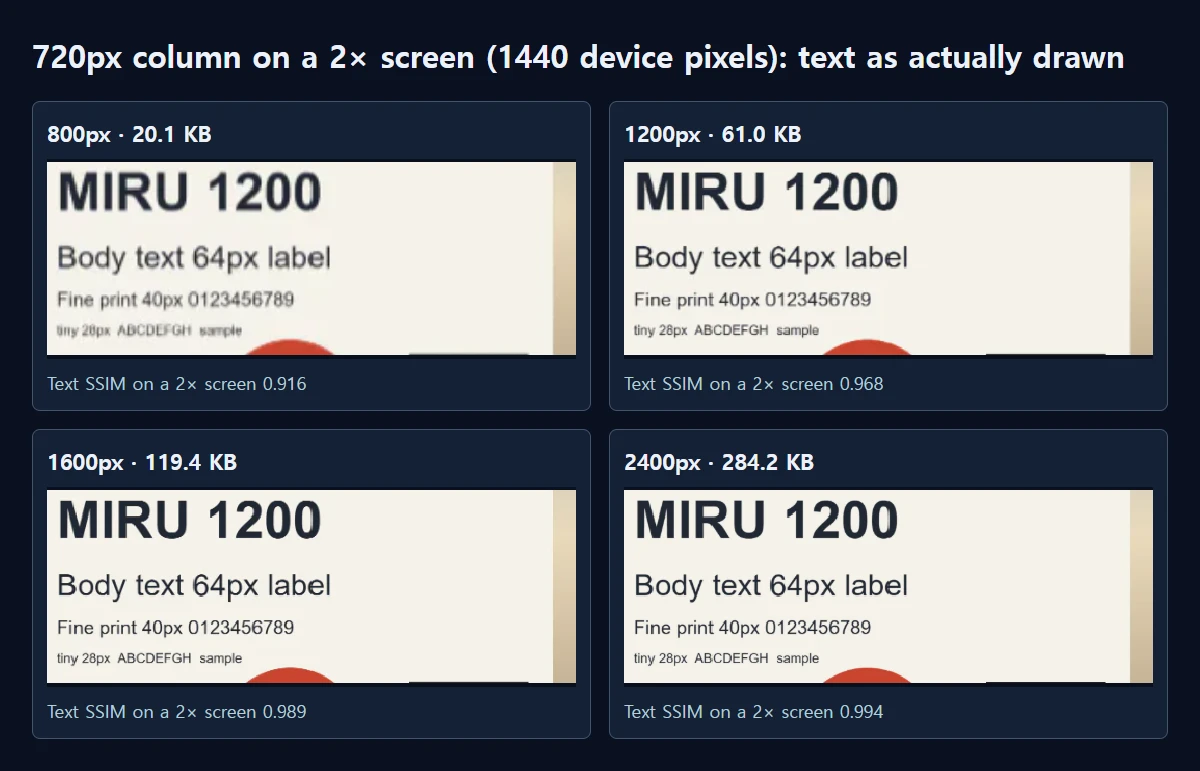
The same column on a 2× screen needs 1440 device pixels. At 800px, text SSIM fell to 0.916, and the edge of a black box that finished within 0.80 pixels at 1600px spread over 2.18 pixels. 1200px scored 0.968 and looked slightly soft; 1600px reached 0.989 and 2400px 0.994. In the comparison image 1600px and 2400px are hard to tell apart, yet the files are 119.4 KB and 284.2 KB, more than twice the size. At 800px the 28px small print smeared into an unreadable line and the edges of the large letters blurred; at 1200px the text was readable with slightly soft edges.
A 360px column on a 3× phone (1080 device pixels) has to stretch any image narrower than 1080. There, 800px scored 0.926, 1200px 0.977, 1600px 0.988 and 2400px 0.989. On phones too, the big step is up to 1200px, and past 1600px the results are almost the same.
Think in terms of the whole post
A few dozen kilobytes look small for one photo, but a post often has ten. From these results, ten 1600px WebP images come to about 1.2 MB, ten at 2400px to about 2.8 MB, and keeping the full 3200px as WebP costs 503.6 KB each, about 4.9 MB. On a 2× screen the text SSIM gap between 1600px and 2400px was 0.005, so you would be sending more than twice the data for it. Readers on mobile data pay for that in waiting time.
How to set it in MiruKit
- Open your photos in Resize images. You can choose several at once.
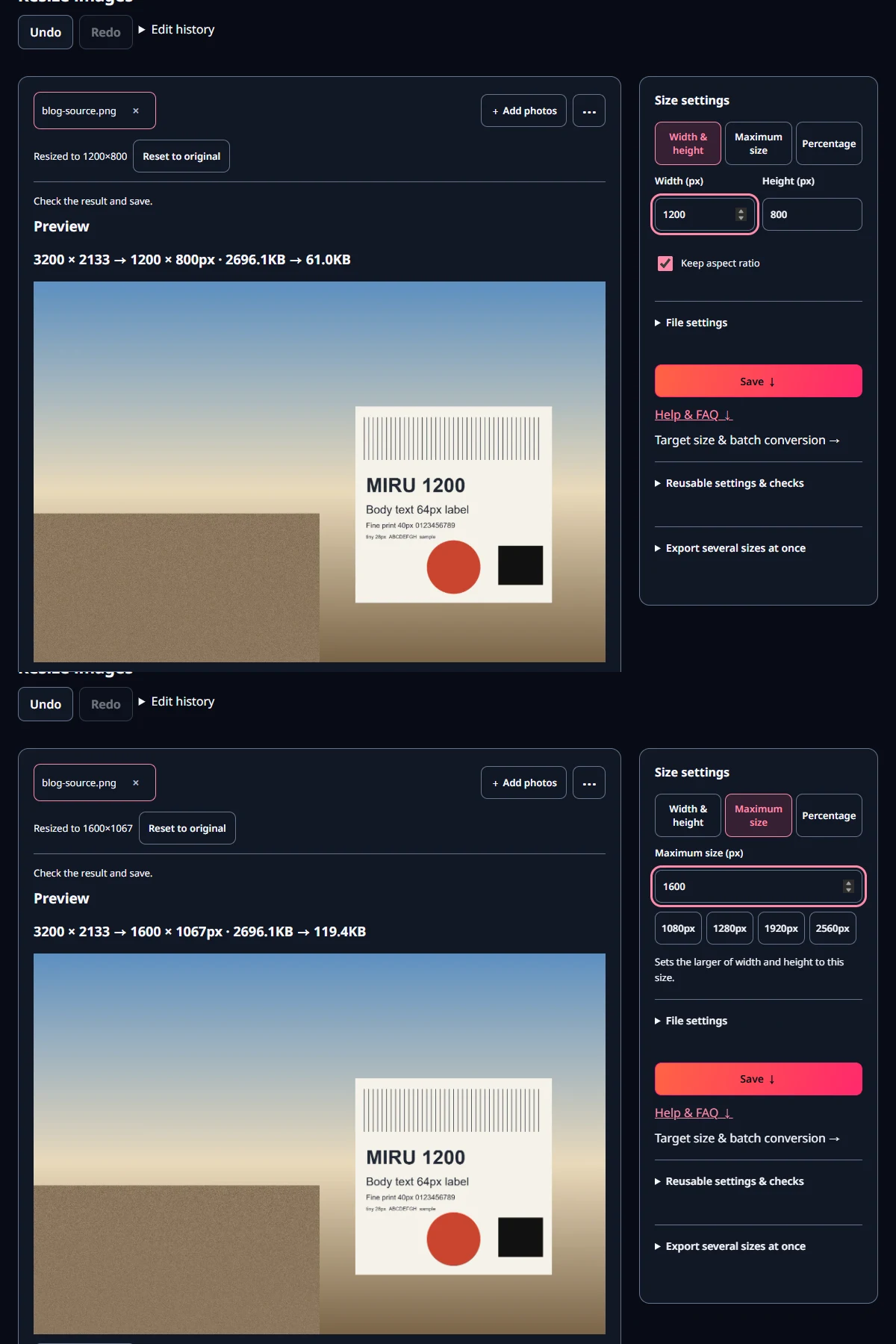
- Choose Width & height and type 1600 in Width (px). With Keep aspect ratio on, the height follows.
- If some photos are portrait, choose Maximum size and type 1600 in Maximum size (px). The longer side is set to 1600.
- Pick WebP or JPEG under File settings, check the size shown in the preview, and save.
If a shop needs the lightest possible pages, 1200px is a good compromise: slightly soft on a 2× screen, at about half the size of 1600px. If your design shows photos across the full screen, multiply that width by the pixel ratio and work it out again.
Open the related toolMeasured with MiruKit
| Width | WebP / JPEG size | 1× screen · 720px column · text SSIM | 2× screen · 720px column · text SSIM | 3× phone · 360px column · text SSIM |
|---|---|---|---|---|
| 800px | 20.1 KB / 24.5 KB | 0.962 | 0.916 | 0.926 |
| 1200px | 61.0 KB / 64.6 KB | 0.984 | 0.968 | 0.977 |
| 1600px | 119.4 KB / 135.3 KB | 0.985 | 0.989 | 0.988 |
| 2400px | 284.2 KB / 273.2 KB | 0.987 | 0.994 | 0.989 |
A synthetic 3200×2133 scene (text, thin lines, fine texture) was saved by the same processImage as Resize images at widths 800, 1200, 1600 and 2400px as WebP and JPEG quality 85. Each file was then shown in Edge in an img sized to a body column (720 or 360 CSS px) at device pixel ratio 1, 2 or 3 and captured in device pixels. Text SSIM compares that capture with the original reduced precisely (lanczos3) to the same pixel count.
Good to know
These numbers come from one drawn image captured in Edge on our test PC, changing only the pixel ratio. Real phone screens, other browsers and services that recompress uploads can give different results.
Blog platforms sometimes shrink or recompress uploaded images again. After posting, zoom in on the live page once to check.
Official sources
Sources checked 2026-10-27